
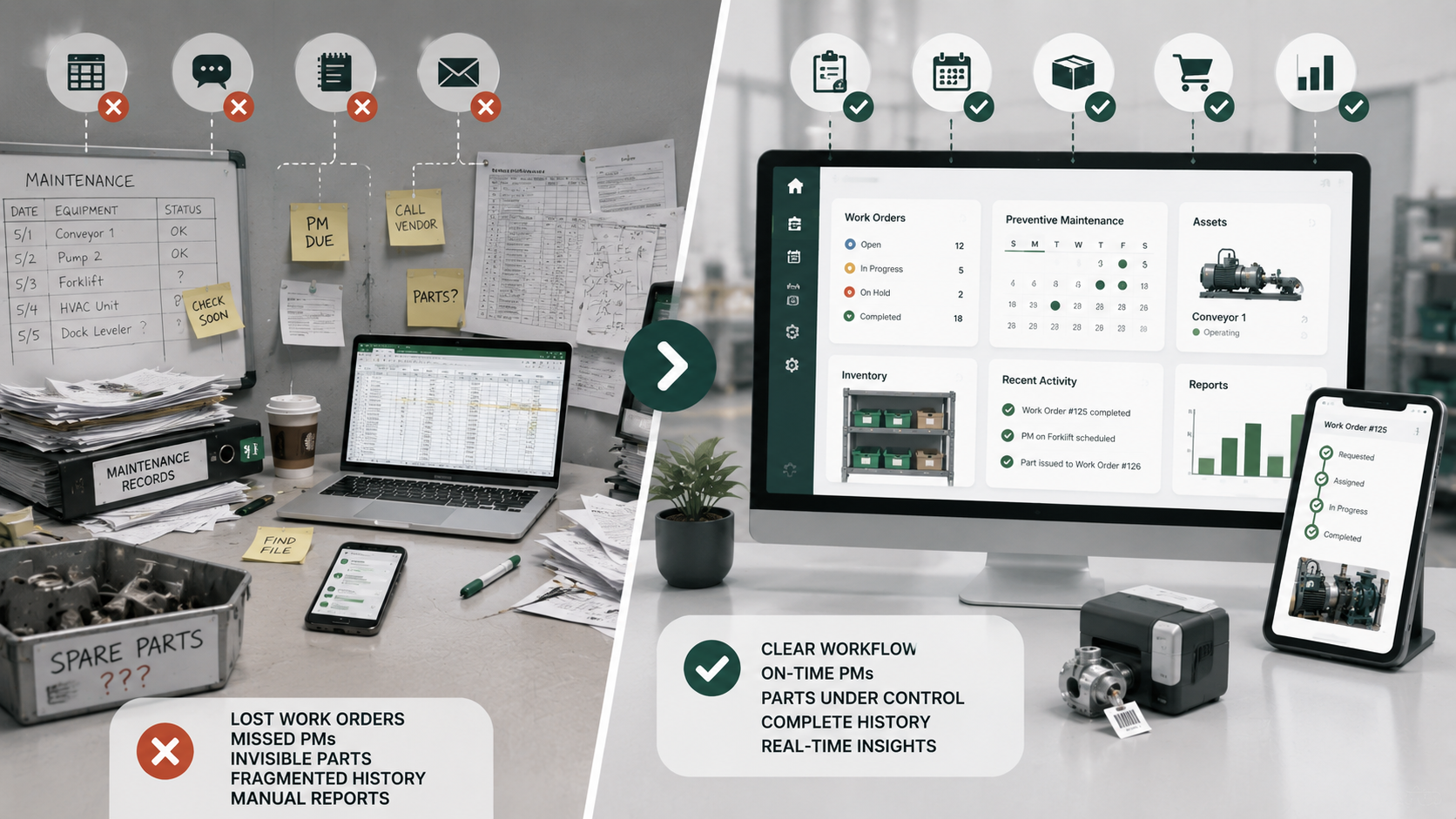
Every maintenance team starts simple. A shared spreadsheet, a WhatsApp group for urgent requests, a notebook in the toolbox. That works for a while. But at some point the cracks start showing — work orders get lost, preventive maintenance gets postponed "just this once," spare parts run out without warning, and finding history on a specific asset means digging through old emails.
The question isn't whether spreadsheets can work. They do, for a time. The real question is: how do you know when it's time to switch to a CMMS?
Why spreadsheets feel fine at first
Spreadsheets are flexible, familiar, and free. You can create a column for work order number, one for asset name, one for status, and call it a maintenance log. When somebody submits a request, you type it in. When the job is done, you mark it complete.
This works perfectly for:
- A handful of work orders per month
- One or two people managing everything
- Simple tracking of a single site
- No need for structured history or recurring tasks
The problem isn't the spreadsheet. It's what happens as the team and the workload grow.
The warning signs that spreadsheets are no longer enough
1. Work orders get duplicated or lost
When multiple people can edit the same spreadsheet, version conflicts are inevitable. Someone saves a new row while someone else is filtering. Two people create separate work orders for the same issue. A row gets accidentally deleted and nobody notices until the equipment breaks down again.
In a CMMS, every work order has a unique ID, a clear status, and an owner. Duplication is prevented by design, not by discipline.
2. Preventive maintenance gets postponed and forgotten
A spreadsheet can list your PM tasks with dates. But it won't remind you when one is due. It won't generate a new work order automatically. It won't track whether the PM was actually completed or just checked off.
The result: PMs that should happen weekly slip to biweekly, then to "whenever someone remembers." Equipment that could last years starts failing early.
A CMMS schedules recurring maintenance automatically, creates work orders on the due date, and records completion with timestamps and notes.
3. Spare parts inventory is invisible
You order a part, store it somewhere, and hope someone writes it down. When a technician needs a spare for an urgent repair, they check the shelf — and it's empty because nobody logged the last withdrawal.
With a CMMS that includes inventory management, every part movement is recorded: when it arrived, where it was stored, who used it, and which work order it was consumed on. Reorder alerts can prevent stockouts before they cause downtime.
4. Asset history is scattered across emails and notebooks
A technician replaces a bearing on a conveyor motor. Three months later, the same motor fails again. Was it the same issue? What part was used last time? Who did the work?
Finding the answer means searching old emails, flipping through notebooks, or asking someone who might remember. By the time you have the information, you could have already replaced the motor.
A CMMS keeps a complete history for every asset: past work orders, parts consumed, recurring issues, checklists completed, and photos from previous interventions. Everything is one scan of a barcode away.
5. Reporting requires manual effort
If your manager asks "how many work orders did we complete last month?" or "which equipment had the most downtime?", a spreadsheet requires manual counting, filtering, and formatting. It takes hours and is prone to error.
A CMMS provides real-time dashboards with open work orders, overdue PMs, completion rates, asset downtime, and spare parts consumption — no manual counting required.
For teams at this transition point, a lightweight CMMS for small maintenance teams can add structure without requiring an enterprise rollout.
What a CMMS does differently
A CMMS (Computerized Maintenance Management System) is purpose-built for maintenance workflows. Instead of a generic grid of rows and columns, it gives you:
- Structured work orders with status, priority, assignment, checklist, parts, and attachments
- Automated preventive maintenance with recurring schedules that generate work orders automatically
- Asset history that follows each piece of equipment throughout its lifecycle
- Inventory control with storerooms, stock movements, and consumption tracking
- Mobile access so technicians can open, update, and close work orders from the field
- Role-based access so technicians see their work and managers see the full picture
- Barcode and QR scanning to identify assets, locations, and spare parts in seconds
How to migrate from spreadsheets to a CMMS gradually
Switching to a CMMS doesn't mean you need to migrate everything on day one. A practical migration looks like this:
Week 1: Start with work orders
Stop creating new work orders in the spreadsheet. Start using the CMMS for all new requests and assignments. Keep the old spreadsheet as a read-only archive.
Week 2: Add your assets
Import your equipment list into the CMMS. Attach model, serial number, location, and any existing history. Link new work orders to the correct asset.
Week 3: Set up recurring PMs
Identify the maintenance tasks you already perform on a regular schedule. Create recurring PM schedules in the CMMS. Let the system generate work orders automatically going forward.
Week 4: Add spare parts and inventory
Import your spare parts list and current stock levels. Start recording parts consumption on work orders. Remove parts from inventory when they are used.
Month 2: Close the spreadsheet
By this point, all active maintenance is running through the CMMS. Archive the old spreadsheet. If you need historical data, most CMMS tools support bulk import.
When to stay on spreadsheets
Spreadsheets are still the right tool in some cases:
- You handle fewer than 10 work orders per month
- You have a single technician who manages everything
- You don't have recurring preventive maintenance tasks
- You don't need to track spare parts or asset history
- The team is not growing and the workload is stable
If none of these apply, a CMMS will save you time, reduce errors, and protect your equipment investment.
Summary
Spreadsheet limitations and the CMMS response
- Manual data entry becomes structured maintenance workflows.
- Manual PM reminders become recurring schedules and generated work orders.
- Scattered records become history linked to each asset.
- Inventory tracked by memory becomes recorded stock movements.
- Manual reporting becomes a current operational view.
- Duplicate rows become uniquely identified work orders.
Spreadsheets are a reasonable starting point. But as your maintenance operation grows, the gaps become hard to ignore. The right time to switch is when you start asking: "Did that work order get done?" or "When was the last time we serviced that equipment?"
If those questions sound familiar, it's time to try a CMMS.
Ready to move beyond spreadsheets? Start a free trial of Liquid CMMS — no credit card required. Built for lean maintenance teams that need structured work orders, automated PM, and inventory control without enterprise complexity.