
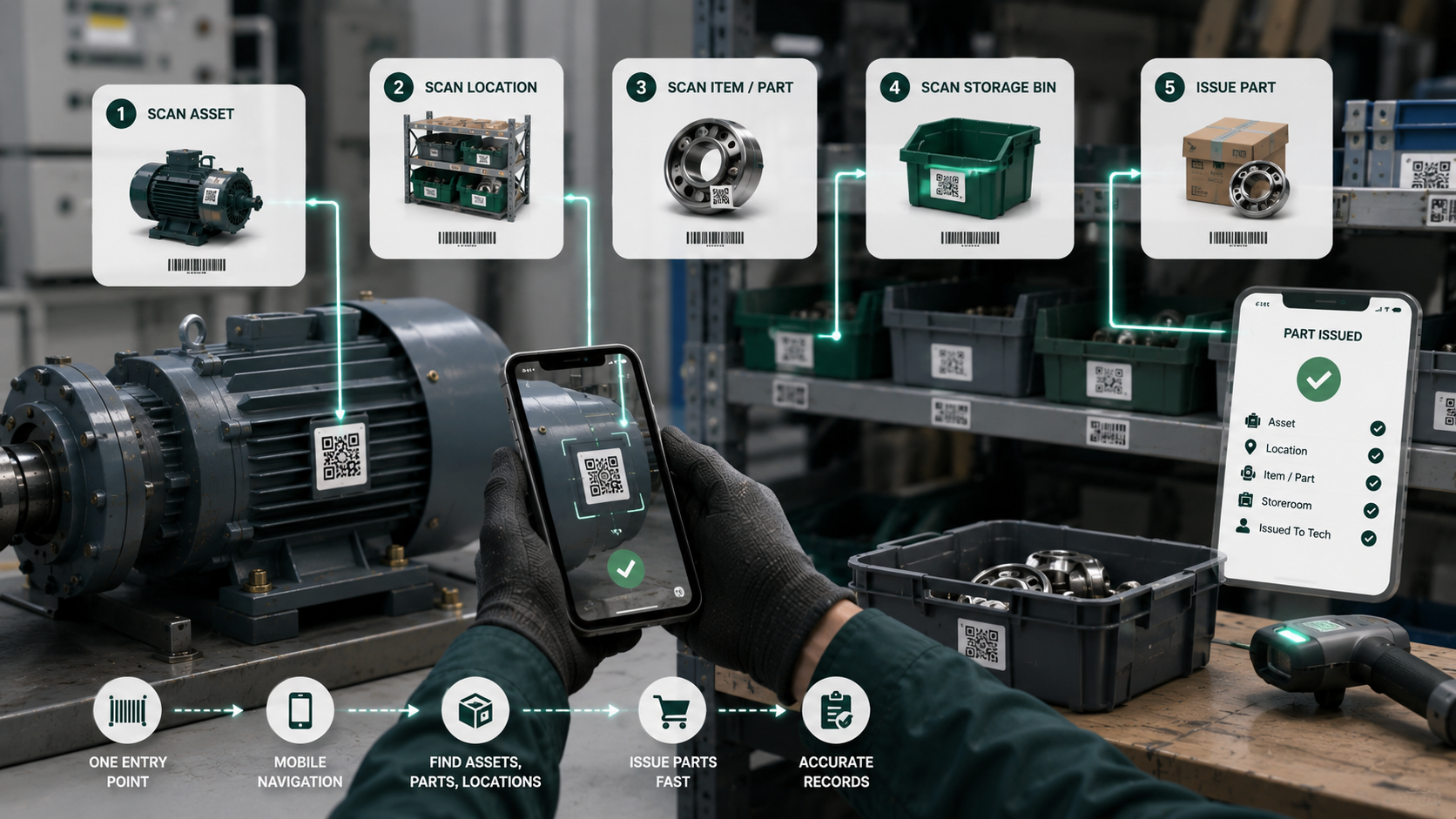
Barcode is useful when it removes friction
Barcode workflows are not about looking modern. They are about cutting the time spent searching for the right asset, location, item, or storeroom.
Where barcode helps first
For lean teams, the highest-value scans are usually:
- opening the right asset page on the phone
- identifying a storeroom quickly
- issuing the right spare part without typing codes manually
- confirming that work was performed on the intended location
Keep the lookup universal
The fastest experience is one scan entry point that resolves to:
- asset
- location
- item
- storeroom
That avoids training users on multiple scan flows.
Do not overbuild the mobile layer too early
A responsive web flow with camera scanning is often enough for an MVP. Native wrappers and deeper device integration can come later if the team is already using the workflow every day.
Inventory accuracy depends on execution discipline
Barcode alone does not fix stock accuracy. It improves accuracy only when part issue and transfer become part of the normal work order flow.
Three practical scan workflows
Scan an asset before starting work
An asset label should open the equipment record, active work orders and recent intervention history. The technician starts with the correct context instead of searching by name or serial number.
Scan a part when it is issued
Scanning a spare part from the work order should identify the item, storeroom and quantity used. This connects inventory movement to actual maintenance work and reduces duplicate entry.
Scan a location to report an issue
Location labels are useful where the problem belongs to an area rather than a single asset. A scan can prefill the building, line, room or warehouse zone before the request is submitted.
Mobile design matters more than the label
A barcode workflow fails if the page behind the scan is slow or difficult to use with one hand. Field teams need readable controls, short forms, clear confirmation and a graceful fallback when a code is damaged. See the practical requirements in our mobile CMMS guide.
Roll out one workflow at a time
Start with the lookup that removes the most repeated searching. Label a controlled set of assets or parts, observe how technicians use it, then expand. Avoid printing hundreds of labels before names, locations and inventory records are clean.
Implementation checklist
- Use a stable identifier that does not expose editable names.
- Make labels readable and replaceable in the real operating environment.
- Test camera scanning on the phones technicians actually carry.
- Keep manual search available as a fallback.
- Connect part scans to maintenance inventory movements, not to an isolated scan log.
- Review failed scans and duplicate records during the pilot.
Try these workflows against real equipment during the 30-day Liquid CMMS trial.
Final thought
The best scan flow removes a repeated decision: identify the context, complete the maintenance action and keep moving.